

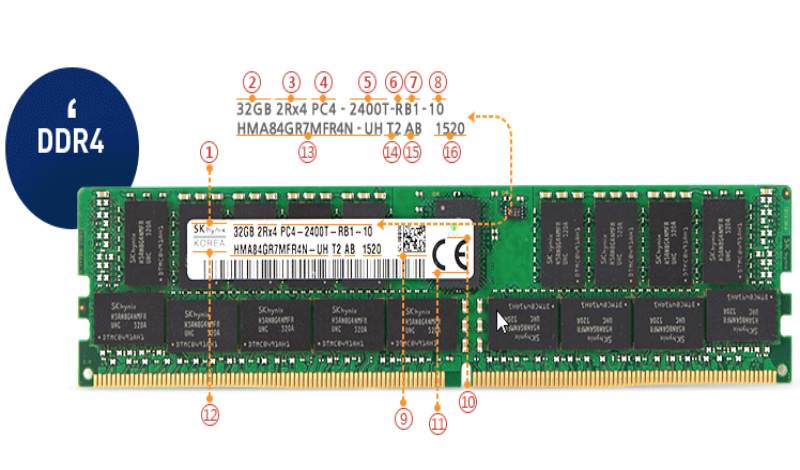
Have you ever tried to or successfully replaced your desktop or Laptop computer ram module? I’m sure you wondered what all those numbers printed on the label meant. We came across this on the SK Hynix website and since we receive plenty of questions about this subject, it is only fair we share.
SK Hynix is a South Korean semiconductor manufacturer and specialises in Memory and System semiconductors. SK Hynix is a high-quality ram manufacturer for some of the major electronics manufacturers and is highly rated for very stable and durable ram modules.
SK Hynix DDR4 Ram Module Label Details
The label information is quite detailed and includes but not limited to the “SK Hynix logo”, “Ram Module type”, “Manufactured Year & Week” and more. As part of the Joint Electron Device Engineering Council JEDEC Solid State Association, this information might not differ too much from what you’ll find on other brand’s ram module labels.
JEDEC Solid State Technology Association, a semiconductor trade and engineering standardization organization, set out global standards for the microelectronics industry.
The Module Label
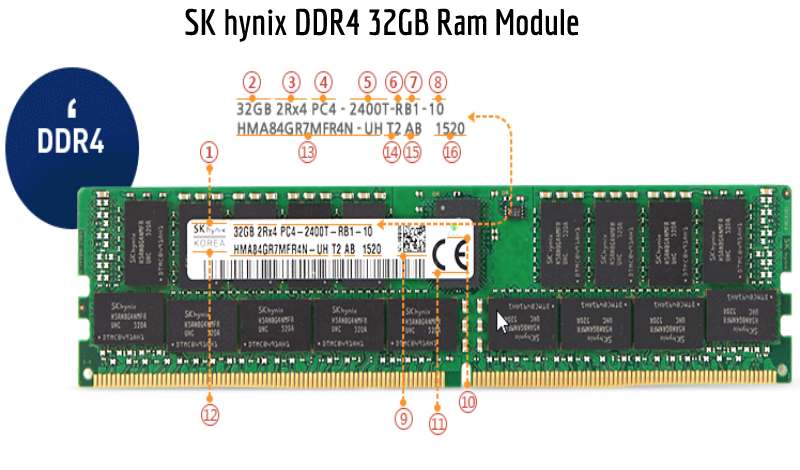
This looks like any other DDR4 ram module label out there but has been labelled very nicely by the guys at SK Hynix from 1 which is the “SK Hynix logo” to 16, the “Manufactured Year and Week”.
Definitions And Descriptions
A set of definitions and descriptions to match the RAM module label has just the right amount of detail.
| No. | Definition | Description |
|---|---|---|
| (1) | SK hynix Logo | SK hynix |
| (2) | Module Capacity | Number of DDR4 DRAM storage in module |
| (3) | Module Configuration | Number of ranks of memory installed and Device organization |
| (4) | Memory Technology | DDR4 Product |
| (5) | Module Speed Grade |
1600K: 1600 11-11-11 1866M: 1866 13-13-13 2133P: 2133 15-15-15 2400T: 2400 17-17-17 2666U: 2666 19-19-19 |
| (6) | Module Type |
U: 288pin Unbuffered DIMM R: 288pin Registered DIMM S: 260 pin Unbuffered SO-DIMM L: 288pin LRDIMM N: 288pin NVDIMM |
| (7) | Gerber Revision | JEDEC Reference design file used for this design |
| (8) | SPD Revision | JEDEC SPD Revision Encoding and Additions level |
| (9) | 2D Barcode | N/A |
| (10) | Eco Logo | N/A |
| (11) | CE Mark | N/A |
| (12) | Country | Country of origin |
| (13) | Part Number | Please refer to the [SUPPORT > Technical Support > Part Number Decoder] |
| (14) | Module Option Code | Please refer to the next slide |
| (15) | Process Code | Internal use |
| (16) | Year & Week | Code of Manufactured Year & Week |
Conclusion
Hopefully, next time you decide to purchase a ram module, you have some details to look out for before hitting that “Buy Now” button. Two things surely to look out for will be Numbers 6 and 16, which indicates “Module Speed Grade” and “Manufactured Year & Week” code.
If you have an SK Hynix ram module and need the label information, visit the SK Hynix DDR4 product page in the link below, select your ram from the list, click the Part Number “Part No.”, scroll to the bottom of the “Parts Detail” overlay and download the “Label Information”
Questions People Ask
What is computer RAM?
RAM stands for Random Access Memory and is a very important component of your computer. The RAM is the short-term memory of a computer. Whenever you browse the internet, access files locally or leave unsaved documents open for later use, your computer stores all that information in your RAM for quick and easy access rather than on the hard disk drive.
What is the difference between DIMM and SO-DIMM RAM modules?
The main Difference between DIMMs and SODIMMs is the size of the RAM module. Generally, desktop computers use the full-size RAM modules known as DIMM (Dual Inline Memory Module). Laptops and some small form factor computers utilise reduced-size RAM modules known as SODIMM (Small Outline DIMM).
